
Building automations
Turn a fixed workflow into a reusable plan with inputs, reliable handoffs, and explicit failure behavior.
Start with the guestbook check-and-review workflow,
then make it useful for more than one task. An input chooses the area to review;
commands check the relevant files; an agent returns a structured result that the
next step can save and present. A single command is shorthand for a one-step
plan; use steps as the workflow grows.
Start with the complete bundle
Download the extended guestbook workflow and
extract it. The folder contains automation.yaml, a review schema under
schemas/, and two small Bash helpers under scripts/. It requires Node.js,
Bash, and a configured agent backend. The guestbook app itself still has no
build or installation requirement.
From a terminal in the example project, create the managed automation:
hob automation init --bundle /path/to/guestbook-builder --scope privateThe definition omits its ID so hob generates one. The manifest and supporting files are installed together; this command does not run them. The sections below explain parts of that complete bundle, rather than independent YAML files.
To change a saved automation, open it in the full Automations view. Use File for its YAML or ask the builder agent to edit the bundle. Configuration exposes common controls, including agent instructions and model selection. Steps execute in the run's resolved environment; see Execution environments when you need a particular branch or worktree.
Choose what to review
The input turns one fixed prompt into a reusable task:
inputs:
  scope:
    description: What should the agent review?
    type: choice
    options: [app, styles, all]
    default: all
hob asks for the value before running. app covers JavaScript and markup;
styles covers the stylesheet and markup; all covers both. Inputs are required
by default. This example is interactive; workflows that declare structured
inputs cannot be scheduled or use a restart policy.
Run the relevant checks
Use a condition to skip the JavaScript check when reviewing only styles:
- id: check
  name: Check JavaScript
  if: ${{ inputs.scope != 'styles' }}
  exec: node
  args: [--check, app.js]
The stylesheet step uses the complementary condition and runs the bundle's
check-styles.sh helper. That helper checks only that style.css exists and is
nonempty; it does not validate CSS or appearance.
Prefer exec and args for a program invocation. Use run when you need shell
syntax. Executable paths and run source are static; pass changing values
through arguments or environment variables. Read authored helpers from
${{ automation.dir }} and write generated files to ${{ run.dir }}.
Give the agent a result contract
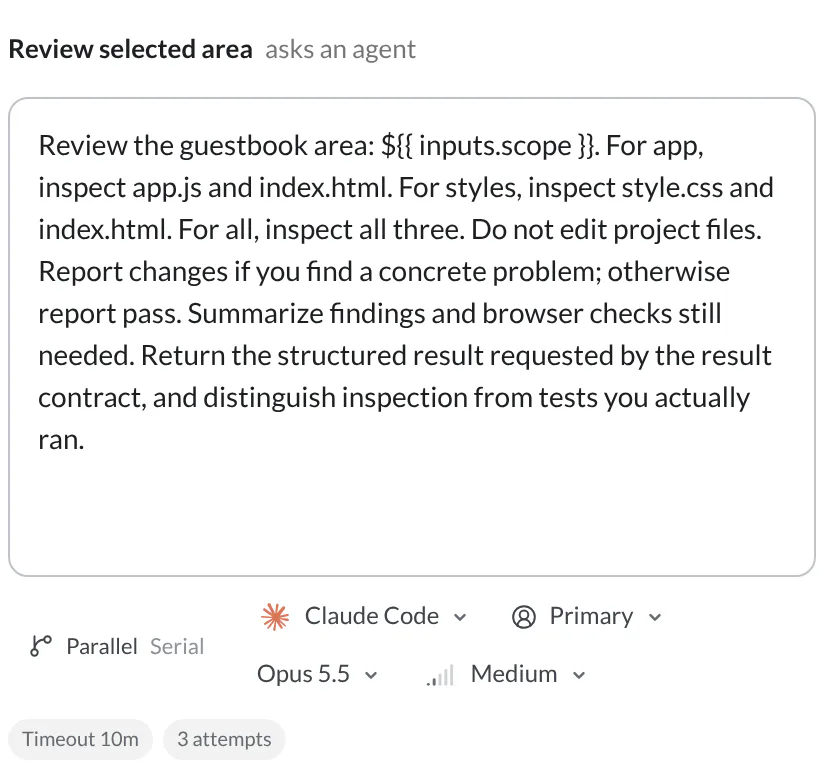
The review prompt includes ${{ inputs.scope }} and asks the agent to inspect
that area without editing project files. These fields on its agent mapping
require a structured response:
permission-mode: ask
result:
  format: json
  schema: ${{ automation.dir }}/schemas/review.schema.json
The bundled JSON Schema requires a verdict of pass or changes, a nonempty
summary, and no additional properties. hob supplies the schema to the agent
and validates its final response before publishing ${{ steps.review.result }}.
A pass verdict means the agent reported no concrete finding from its inspection.
Agent steps use the permission mode you set. A schema constrains the result's shape, not the correctness of the review. This example uses Ask mode; remain available for permission requests.
The builder has no step-type picker or dedicated result-schema field.
Add those fields in YAML or ask its agent to make the change. The supported
step actions are run, exec, agent, present, automation, and refresh;
see the step reference.
Pass the validated result forward
The next step gives the helper the complete JSON result as data:
- id: save
  name: Save the review result
  exec: bash
  args: ["${{ automation.dir }}/scripts/save-review.sh"]
  env:
    REVIEW_JSON: ${{ steps.review.result }}
save-review.sh uses printf to write that value to
$HOB_RUN_DIR/review.json; it never evaluates it as shell code. The final
present step snapshots this file and shows it as source, so the result stays
with the run. See the completed-run example
for inspecting steps and artifacts.
Expressions treat a step result as a string. There is no
steps.review.result.verdict field lookup. To branch on a JSON property, first
parse it in a deterministic helper and publish a named value through
HOB_OUTPUT, then read steps.<id>.outputs.<name> in a later condition. This
bundle keeps both verdicts visible instead of suppressing a passing report.
When steps run and what happens when one fails
Steps normally run in order. A false if produces Skipped, with an empty
exit code. A failed required step stops the plan; later steps are Not run.
Use on-error: continue only when later steps can handle that failure explicitly.
The review step has a ten-minute timeout and up to three attempts:
timeout: 10m
on-error: retry
retry:
  max-attempts: 3
If the JSON result fails its schema, hob sends validation feedback to the same agent conversation and asks for a correction. A missing or invalid schema file is a setup error and is not repaired by retrying the agent. See Retries and timeouts.
Optional: independent reviews in parallel
For a larger review, adjacent new-agent steps with the same parallel name can
run together. For example, one agent can inspect note behavior while another
checks appearance; the next step waits for both. Keep their work read-only when
they share a checkout.
- id: behavior
  name: Review note behavior
  parallel: review-pair
  agent:
    prompt: Inspect app.js and index.html for note-entry problems. Report findings without editing files.
    permission-mode: ask
- id: appearance
  name: Review appearance
  parallel: review-pair
  agent:
    prompt: Inspect style.css and index.html for layout concerns. Report findings without editing files.
    permission-mode: ask
This is an optional extension, not part of the download. Cohorts support agent steps that create distinct panes, up to eight members; shell checks and presentation steps remain outside them. Members cannot read sibling results, reuse panes, or declare retries. See Parallel analysis for the full constraints.
Clean up resources the workflow creates
Use top-level finally for cleanup after a prepared run, including a failed or
stopped run. Cleanup steps must use run or exec, each with a timeout. The
example creates no temporary service or scratch resource requiring explicit
cleanup; hob manages its run directory. Add cleanup when your own workflow
introduces such a resource, and target that resource precisely. See
Cleanup with finally.
Reuse a plan as a step
A nested automation step calls another managed bundle using its static
scope:uuid identity. Pass ordinary values through the step's inputs, then
read the child's declared outputs from steps.<id>.outputs.<name>. Use
hob automation show to find the correct identity rather than a display name
or guessed registry path. See
Nested automations.
For agents
Use hob automation init --stdin for a definition without supporting files, or
hob automation init --bundle <folder> for a complete staged bundle. Check it
with hob automation validate; use hob automation show for managed paths and
hob automation apply --bundle <folder> to replace a linked builder's bundle
atomically. Invalid input must be corrected before it can be applied.
For an HTML-template presentation, run hob automation inspect <id-or-name> --step <step-id> --data-file <json> before handing it back. That preflight checks
data injection and inline JavaScript without running the workflow. The JSON-file
presentation in this guide does not need an HTML-template preflight.
Next
Secrets, schedules, and trust
Turn the unattended parts into a scheduled workflow.
Automation reference
Look up exact fields, expression rules, and lifecycle constraints.
Secrets and unattended runs
Review credential boundaries, shared trust, schedules, and startup policies.
Automations
Run the first workflow and inspect its retained report.